I launched my portfolio site today, and I built it to solve a problem I see all the time. Business owners spend good money on a website, then wonder why it doesn’t bring leads, trust, or calm. It sits there like a brochure in a locked drawer.
If that sounds familiar, you’re not behind. You’re just missing a few key choices that make a site feel clear, helpful, and worth contacting. In this post I’ll walk you through the exact thinking behind iain-white.com and what I focused on, so you can apply the same approach to your own site without turning it into a six-month project.
I’ve been a CTO and IT consultant for a long time, and one lesson keeps proving itself. People before technology. A website is not a tech project. It’s a trust project.

What I built at iain-white.com and why it matters
The first job of a portfolio site is simple. Help a stranger quickly answer, “Is this person for me?”
That means iain-white.com needs to do three things well:
- Explain what I do in plain English No buzzwords. No “digital transformation” fog. Just clear outcomes.
- Show proof without showing off Proof can be case studies, results, testimonials, or even clear examples of how you think.
- Make the next step obvious If someone wants to talk, they shouldn’t need to hunt for how.
If you want to have a look, it’s here: https://iain-white.com
A quick note. You don’t need a “perfect” site. You need a site that makes it easy for the right people to say yes, and easy for the wrong people to move on.
The 7-page structure that stops your site feeling “unfinished”
A common trap is building a homepage, then getting stuck. Or building ten pages, then losing the thread.
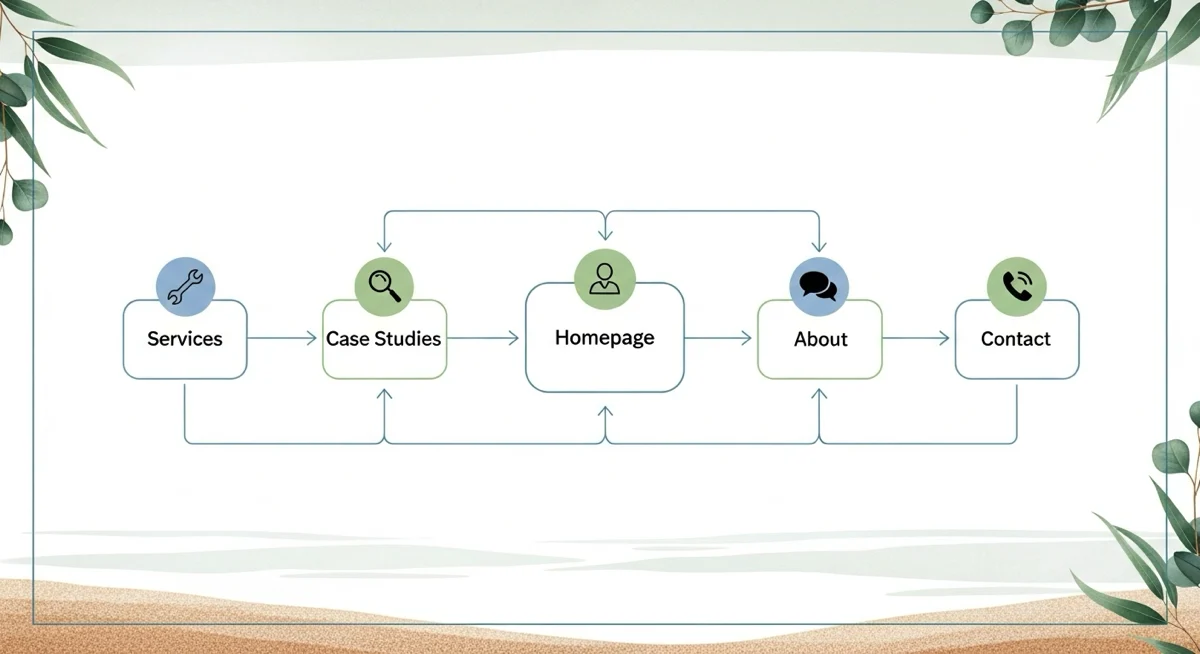
Here’s the structure I like for most SME service sites, including a portfolio site like Iain White runs:
- Home: Who you help, what you help with, and the next step
- Services: Clear offers, pricing approach, and what working together looks like
- Case studies: Short stories with a clear problem, action, result
- About: Your story, values, and why you work the way you do
- Blog: Helpful posts that answer client questions
- Contact: Simple form, email, maybe booking link
- Privacy/Legal: Boring but necessary
The goal is not pages for the sake of pages. It’s clarity.
The biggest mistake I see: designing for you, not for them
Most business owners write websites like a resume. It makes sense in your head. It doesn’t match how a buyer reads.
Your visitor is usually thinking:
- “Do you understand my world?”
- “Can you explain this without making me feel silly?”
- “Will this save me time, stress, or money?”
- “What’s it like working with you?”
- “What happens next?”
In my years as a CTO, I’ve watched great businesses lose work because their website made them feel complicated. Not because they were complicated. Because the site was.
So I build around real people. The office manager who just wants systems to stop breaking. The founder who needs a plan and hates surprises. The team that wants tools that actually get used.
A simple checklist I used before I hit “publish”
This is the stuff that makes a site feel “ready” even if it’s small.
Content checks
- Clear headline: Who you help and what you help with
- Plain language: If your mum wouldn’t understand it, rewrite it
- Proof: A few wins, outcomes, or examples
- Next step: One primary call to action, not five
- Contact details: Easy to find on every page
Trust checks
- Fast loading: Especially on mobile
- Mobile-friendly layout: Most visitors are on phones
- Real photo (optional but helpful): People like people
- Professional email: Not a random free address
- Privacy policy: Helps with trust and compliance
SEO basics
- One primary keyword per page
- Headings that match what people search
- Good page titles and meta descriptions
- Internal links to related pages
- Alt text for images
If you want a quick win today, do this. Ask a friend to visit your homepage and answer one question:
“What do you think I do, and who do you think I do it for?”
If their answer is fuzzy, your website is fuzzy.
Practical SEO for a new site without turning it into a second job
SEO can feel like a dark art. It’s not. It’s mostly about being useful and being clear.
Here’s how I approach it for a portfolio site like iain-white.com:
- Pick one main phrase per key page Don’t try to rank a single page for everything.
- Write headings that match real questions People search questions. Answer them.
- Use your name and brand naturally “Iain White” belongs in key places, but not everywhere.
- Create a few strong blog posts Not dozens. A handful of helpful posts beats a pile of fluff.
- Connect related pages with internal links This helps readers and search engines understand your site.
A new site doesn’t rank because it exists. It ranks because it’s useful, consistent, and clear about what it’s for.
How I keep “people before technology” in a website build
This is the bit I care about most.
A website should reduce stress, not add it. For you and your customers.
So I ask three people-first questions:
- What problem is the visitor trying to solve today? Not what you want to say. What they need to hear.
- What’s the smallest next step that feels safe? A call, a form, a download, a short consult.
- What would make this feel trustworthy in 10 seconds? Clear words, real outcomes, a calm design, and no pressure.
I’ve seen brilliant systems fail because nobody used them. Websites are the same. If the site is confusing, people bounce. If it’s clear, they lean in.
What I’d do if I were launching your SME site this week
If you’re busy and you want a plan you can actually follow, use this.
Day 1: Get the message right
Write one sentence:
“I help [type of business] achieve [outcome] without [pain].”
Day 2: Create three proof points
- A short case study
- A testimonial
- A simple “how I work” section
Day 3: Build the key pages
Home, Services, About, Contact. Keep it lean.
Day 4: Add one helpful blog post
Pick a real question clients ask you and answer it clearly.
Day 5: Make it easy to contact you
One primary call to action. Clear form. Fast response promise you can keep.
If you do just that, you’re ahead of most sites already.