I am Iain White. For many years, I have helped companies improve their ways of working. My approach puts people first and technology second. Processes without humans in mind can cause frustration. Kanban aligns perfectly with this mindset. It highlights the flow of work, respects human limits, and gives each team member a clear view of tasks. In my early days, I tried fancy tools before understanding the simple power of a visible board. That “aha” moment happened when a team noticed half their tasks were stuck in progress for weeks. We pinned those items on a whiteboard, set a limit on how many tasks could be open at once, and cut wasted effort. Ever since, I have been a strong believer in this system.
The Origins of Kanban
Kanban traces back to the Toyota Production System. A big breakthrough happened when Toyota engineers realised they could shape manufacturing efficiency by applying a “pull system.” That means you only pull new tasks once capacity is available. Over time, knowledge workers saw they could adapt these ideas to software development and other fields.
This approach focuses on visual signals and limiting ongoing work. Instead of stacking an endless queue of tasks, you start with fewer items, see them through, and then pull the next. It may sound simple, but there is a deep effect on productivity and morale.
Why Visual Cues Matter
Imagine you walk into a grocery store and your shopping list is on your phone, buried under multiple apps. You might open and close the phone repeatedly, switch apps, and lose track of what you needed. Then think of stepping in with a written list. You can see each item at a glance, check them off, and act faster. That is the essence of Kanban’s visual approach.
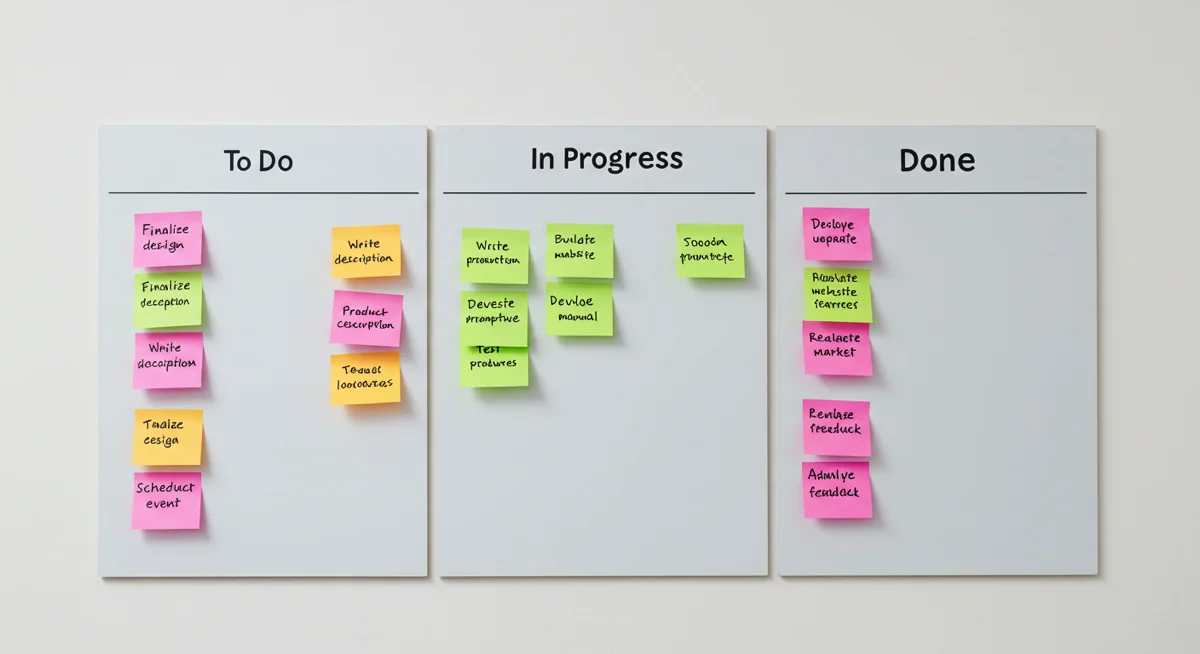
By mapping tasks in columns on a board, people do less rummaging through complicated lists. They see which tasks are in “To Do,” “In Progress,” and “Done.” Visibility stops the team from overloading themselves because they can spot bottlenecks sooner.
Short Historical Context
- Toyota introduced the concept in manufacturing.
- Lean practitioners later adopted it in knowledge work.
- It expanded to software and business processes.
It all circles back to limiting distractions and focusing on immediate tasks.
Key Principles of a Kanban System
Kanban stands on a few main ideas. Let me outline these to set the stage:
- Start With What You Do Now
You do not need to rip apart your entire workflow. You can place tasks on a visual board as they exist. Then refine step by step. - Respect Current Roles and Processes
Some frameworks force changes in job titles or meeting cadences. Kanban does not. It allows you to keep your structure, introducing small improvements gradually. - Encourage Leadership At All Levels
Leadership does not just come from the boss. Any person can spot a bottleneck or propose a new column on the board. Let people step up with ideas. - Limit Work in Progress (WIP)
This is huge. It might tempt you to start 10 tasks at once. But Kanban says to keep a tight limit. Fewer parallel tasks mean you finish tasks faster, with fewer mistakes. - Visualise the Flow
A board with columns shows where tasks sit. This could be “To Do,” “Doing,” “Review,” “Done.” Or you can customise the columns. What matters is that every person sees tasks moving from left to right.
Kanban vs Scrum
Both Kanban and Scrum come from the Agile family, and each addresses how teams handle tasks. Scrum sets fixed-length sprints, where you plan, execute, and retrospect in a cycle. Kanban drops the concept of fixed sprints and emphasises a continuous flow.
Points of Contrast
- Cadence: Scrum uses time-boxed sprints. Kanban flows without strict deadlines, though you still measure metrics.
- Roles: Scrum has specific roles like Product Owner and Scrum Master, while Kanban does not require formal roles.
- Work in Progress Limits: Kanban sets direct WIP constraints, while Scrum manages WIP by limiting the sprint backlog.
- Planning and Commitments: Scrum teams commit to a sprint scope. Kanban allows pulling in tasks as capacity opens.
I often see teams combine the two. They do a sprint for structured planning but limit tasks in each column. Scrum resources: Scrum.org, Scrum Alliance, Scrum Guides.
Example: Hybrid Approach
I once worked with a software team that loved Scrum’s discipline but felt anxious when tasks spilled over sprint boundaries. We introduced WIP limits to keep them from taking on too much. Each developer set a personal limit of two tasks in progress. This lowered stress and improved quality. That blend of Kanban’s flow with Scrum’s planning gave them the best of both worlds.
Creating Your Kanban Board
Here is where things get practical. A Kanban board can be as simple as a whiteboard and sticky notes. Some might prefer digital tools like Trello, Jira ( Jira site ), or other project management apps. The main point is that tasks must be visible.
Steps to Build a Physical Board:
- Mark columns that represent stages, such as:
To Do -> In Progress -> Review -> Done - Write tasks on sticky notes or index cards.
- Stick them under the column they belong to.
- Observe tasks daily, move them to the right when they progress, or adjust if blocked.
Tips for a Digital Board:
- Create a new project in Trello or Jira.
- Add columns that map to your workflow stages.
- Assign tasks to team members.
- Limit how many tasks can sit in “In Progress” or “Review.”
Board Layout Example
| Column | Description | Team Members Involved |
|---|---|---|
| To Do | Tasks not started yet | Anyone free to pick up tasks |
| In Progress | Tasks actively being worked on | Assigned owners |
| Review | Tasks awaiting checks or testing | QA testers, peers, managers |
| Done | Completed tasks, ready to close | None needed once done |
WIP Limits and Practical Effects
WIP stands for “Work in Progress.” It is central to Kanban. You might wonder, “Why limit how many tasks are in progress?” Consider the mental cost of switching tasks. Each time you juggle more tasks, you use more cognitive load. That results in partial progress across many tasks but fewer tasks actually finishing.
How to Decide on a WIP Limit
- Team Size: If you have five team members, do not exceed about five or six tasks in “In Progress.”
- Task Complexity: If tasks are large, keep a lower WIP limit.
- Experiment: Start with a guess. Then adjust.
- Keep It Visible: Write the limit at the top of your column. If your WIP limit for “In Progress” is five, do not move in the sixth card until one is completed.
Practical Effects
- Faster completion times for each task.
- Fewer half-finished items lying around.
- Less stress on the team.
- Fewer context switches.
I recall a large consultancy project where 15 tasks sat in progress. People forgot half of them. By placing a cap of five tasks in progress, the team cleared tasks more consistently. That was a game-changer for morale too.
Metrics and Continuous Improvement
Teams often ask, “How do we measure success with Kanban?” Metrics can help. Here are a few:
- Lead Time: The time from task creation to completion.
- Cycle Time: The time from when work begins on a task until it is done.
- Throughput: The number of tasks finished in a given span.
Track these. Watch for trends. If cycle time creeps up, see which columns hold tasks the longest. Maybe tasks get stuck in “Review.” You can then add more clarity or more testers.
Continuous Improvement
- Hold brief reviews to see if tasks keep stalling.
- Encourage team members to propose changes.
- Adjust WIP limits if tasks keep backing up.
- Revisit your columns. Maybe “In Progress” is too generic, and you need a “Testing” or “Blocked” column.
Personal story: At one point, I led a group of 10 developers building a critical piece of software. We tracked cycle times every week. We noticed tasks took too long in a “Testing” column. After some digging, we found testers were overloaded. We added more automated testing and created a dedicated “Testing Complete” column so we could see the difference between “Active Testing” and “Awaiting Merge.” Cycle time dropped by 30%. That small tweak made a big improvement.
Common Missteps and How to Correct Them
No system is perfect. Here are a few mistakes people make with Kanban:
- Ignoring WIP Limits
The system collapses if you keep dragging tasks in. You must respect the limit, or you lose the benefits. - Forgetting About Quality
Finishing tasks quickly is good, but do not skip quality checks. Make sure a “Review” or “Testing” column is part of the flow. - Overcomplicating the Board
Too many columns can confuse the team. Stick to a simple layout, then expand gradually. - Lack of Regular Check-Ins
A quick daily chat helps. In my experience, having a five-minute talk near the board keeps tasks moving smoothly. - No Retrospective
Kanban does not force a formal retrospective, but I suggest scheduling them anyway. Improving the process step by step is the key to agility.
Personal Anecdotes from My Career
I have been in the tech field for over two decades, taking on roles like Tech Consultant, CTO, and Agile Coach. One of my favourite stories involves an IT team at a mid-sized company. They were drowning in help desk tickets, new development tasks, and urgent side projects. They had zero visibility into who was doing what.
We set up a large whiteboard with the columns “To Do,” “Doing,” “Blocked,” “Review,” “Done.” We limited “Doing” to four items total. The team felt uneasy at first, worried we were restricting them. After a couple of weeks, they realised tasks finished faster. They had fewer interruptions, and leadership noticed a drop in missed deadlines. That small step raised morale. It brought home my core belief: if you do not keep the human factor at the forefront, no fancy system will fix the chaos.
Another time, I introduced Kanban to a marketing team, not just a tech team. They used it to plan their campaigns and content calendar. The improvement was immediate because they saw upcoming campaigns in the “To Do” column, highlighted any blockers, and finished tasks more predictably.
Tooling and Integrations
Modern teams often want digital tools. Trello and Jira are the most well-known. For more advanced setups, there is Kanbanize or Leankit. Some tools offer analytics for cycle time and lead time.
- Trello – Very visual, easy to onboard new users.
- Jira – ntegrated with broader project management features.
- Asana – ot purely Kanban but has a board view.
Pick something that your team likes and that matches your existing processes. Do not jump from tool to tool because you will lose consistency. A stable system helps maintain historical metrics.

Linking Kanban to Broader Agile Topics
Scrum and Kanban are cousins in Agile. They share the emphasis on continuous improvement, regular check-ins, and user-centric thinking. Some teams use both at once. When they do, they often call it “Scrumban.” You keep a sprint for planning but place explicit limits on tasks in progress.
Lean Software Development is another branch of Agile. Mary and Tom Poppendieck’s “Lean Software Development: An Agile Toolkit” introduced ideas like eliminating waste and amplifying learning. Kanban is a direct expression of those principles in day-to-day life.
For deeper coaching and training about Agile or Scrum or Kanban, you can visit Agile Coaching at White Internet Consulting. That service goes beyond theory, helping your team adapt these ideas in real time.

Extended Guide: Diving Deeper Into Kanban Concepts
Let us look closer at a few essential topics. This extra detail is for those who want a wider perspective, especially if you lead a team or consult in multiple industries.
How Does Pull-Based Scheduling Work?
With a push system, tasks keep arriving whether the team is ready or not. With a pull system, the team only takes new tasks when they have capacity. Think of a busy restaurant kitchen. The chef does not start a new dish if all stoves are full. Once one dish finishes, they pull the next order. Kanban thrives on this principle. It reduces chaos.
Psychological Benefits
Switching tasks constantly drains energy. A simple board that blocks you from starting new items encourages a calmer mindset. You see tasks move from left to right, and that visible sense of progress can boost morale. Even small wins matter. A single note moving to “Done” can give a burst of satisfaction.
Handling Upstream and Downstream Work
Some advanced boards split “To Do” into subcolumns, like “Ready” and “Refinement.” Others split the final columns into “Testing” and “Deployment.” The goal is clarity. You want the board to mirror real steps. Just be careful not to create so many columns that the board becomes unwieldy.
Example Table: Kanban Columns for a Software Team
| Column | Purpose | Notes |
|---|---|---|
| Ideas | Brainstormed tasks that are not yet ready | Items here might need more detail before “Ready” |
| Ready | Fully defined tasks | Tasks with all requirements known |
| In Progress | Active coding or development work | Keep WIP limit visible at the top |
| Testing | Items awaiting QA or user checks | Possibly an extra WIP limit |
| Done | Finished tasks | Move tasks here once tested and accepted |
When Teams Resist Visual Boards
There can be pushback. People might say, “I have my own personal to-do list.” Others might say, “I do not want my tasks displayed publicly.” That is where the human side of this approach matters. Rather than mandating it from the top, it is wiser to have an open chat, ask about pain points, and see if a shared board could help.
Case Study
A marketing manager was reluctant to adopt Kanban. She did not see how it applied to her content campaigns. After a trial week, she noticed tasks that kept stalling without her realising. Seeing them on the board helped her delegate more effectively. She became a fan and asked the design team to do the same.
Measuring Flow Efficiency
Flow efficiency is the ratio of actual work time to total time in the pipeline. For example, if a task takes ten days from creation to done, but actual hands-on work is two days, your flow efficiency is 20%. The rest was waiting time or blocked time. That measure can highlight bottlenecks. If flow efficiency is low, you might need to reduce handoffs or cut wait states between columns.
Linking Kanban to Other Fields
Project Management
People often associate Project Management with Gantt charts. But Kanban is a powerful method too. Tools like Jira integrate a Project Management layer on top of your board. If you want external advice on advanced management techniques, Project Management Services may help you refine your approach.
Agile Coaching
If you are new to Agile or want deeper guidance, you can look at Agile Coaching at White Internet Consulting. Coaches often help teams with transitions to Kanban or Scrum. They also address cultural shifts, because building trust is crucial.
Continuous Delivery
In software, teams aiming for continuous delivery or integration find Kanban to be a handy way to track items from code to release. It pairs well with short feedback loops. If you place a “Ready for Deployment” column on your board, you ensure code moves swiftly to production if checks pass.
The Human Element
This might be the most important part: the people. Teams that adopt Kanban can forget that it is not about a fancy board. It is about giving people a shared view of tasks, so they can help each other. Communication is the linchpin. If the board is left in a corner or no one updates it, the system fails.
From my experience, an Agile mindset is a cultural approach before it is a tool. Kanban cannot fix a toxic atmosphere or a lack of trust. It can, however, highlight areas where more discussion is needed. A blocked card on the board is a conversation starter. The daily check encourages transparency.
Advanced Topics: Metrics, Service-Level Expectations, and Classes of Service
Some teams use advanced Kanban features like Classes of Service, which group tasks by priority or type. For instance, “Expedite” tasks skip the queue if a critical bug hits. “Standard” tasks follow the normal path. “Fixed Date” tasks are linked to a calendar event. Each class might have its own WIP limit.
Service-Level Expectations
Think of a target for how long tasks of a certain class should take. You track whether you meet that expectation. Over time, the team learns what is realistic. Then they can inform stakeholders more accurately. For example, if 80% of tasks take less than four days, you communicate that timeframe to other departments.
Combining Kanban with Lean Startup Ideas
Entrepreneurs or startups can gain from Kanban. By limiting tasks in progress, you avoid drowning in half-baked concepts. The principle of “build-measure-learn” from Lean Startup can mesh with Kanban’s flow, ensuring you only push an idea forward once you are ready to test it.
Common Kanban Myths
- Myth: Kanban Lacks Discipline
Reality: It demands discipline in respecting WIP limits. - Myth: Kanban Is Only for Maintenance or Support Teams
Reality: Development teams, marketing teams, sales teams, and more can apply it. - Myth: Scrum Is Always Better
Reality: Both frameworks can work. The choice depends on your environment, team size, and goal.
Where Kanban Often Shines
- Maintenance or Support: Constant flow of tickets with no fixed sprint.
- Operations: Ongoing tasks that need real-time attention.
- Small Teams: Less overhead with sprints, more fluid approach.
- Hybrid Environments: Where some tasks need quick reaction, others are planned in cycles.
Personal Reflections on “People Before Technology”
I want to reinforce my core belief. People come before any method or gadget. Kanban is user-friendly and reveals bottlenecks, but the team must talk about those bottlenecks openly. If there is trust, the board becomes an ally. If the environment is hostile, the board might become an excuse for finger-pointing. That is why I always coach leaders to nurture a culture of respect and learning.
I recall a time when a new manager tried Kanban. He forced everyone to fill the board, then scolded them for any slowdown. Morale dipped. Tasks got hidden because team members feared blame for delays. We had to reset the approach, emphasise small experiments, and invite the team to shape the board themselves. Kanban only works if the group embraces transparency.
Clearing Up Kanban: Common Questions Answered
1) Does Kanban Work Only for Software Teams?
No, it works in many fields, such as marketing, operations, or support. Anywhere tasks flow in steps, you can visualise them with Kanban.
2) How Often Should We Have Meetings if we Follow Kanban?
There is no fixed schedule, unlike Scrum sprints. Many teams do quick daily chats. Others meet once a week. The important thing is to keep an eye on the board and remove blockers.
3) Is Kanban Good for Large Enterprises?
Yes, but start small. Perhaps roll it out in a few teams first. Prove its value on a smaller scale, then expand. Large organisations appreciate the clarity Kanban brings.
4) What Tools Are Best for Beginners?
Trello is a straightforward choice for beginners. If you prefer more advanced features, Jira might be a good step up.
5) Should We Combine Kanban With Scrum?
Some teams do. You can keep sprints while limiting tasks in progress. Test the hybrid approach and see if it helps your group maintain focus.
Closing Thoughts
Kanban may look simple. Columns and sticky notes, right? Yet the ripple effects are powerful. Teams become more aware, tasks move with less friction, and morale often rises. I have witnessed transformations across different departments and industries. It does not require big changes to existing roles. It does not demand complicated ceremonies. It respects the idea that small improvements over time add up to great results.
The best next step is to try it. Create a modest board, set a WIP limit, and watch how your team adapts. Keep measuring your lead time or cycle time. Adjust. Over time, you will see fewer tasks stuck in limbo and more tasks moving to “Done.” If you want more structured support, feel free to explore Agile Coaching. The big picture is about flow, clarity, and a healthier rhythm of work. And that is the heart of Kanban.